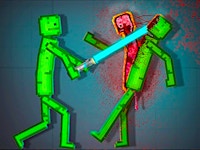
Melon Sandbox is a creative physics playground where you can build your own experiments, test funny ideas, and watch surprising things happen. The game gives you a simple sandbox space filled with interactive objects, characters, tools, and ragdoll physics. You can drag, drop, move, hit, connect, destroy, and rebuild anything you want.
Its pixel-style graphics make the game feel simple and playful, but the physics system gives every action a different result. A small push, a heavy object, or a sudden collision can create completely new situations. That is what makes Melon Sandbox fun: there is no single correct way to play. You decide what happens next.
The game includes two modes. In Free Mode, you can experiment freely and create your own scenes. In Level Mode, you can complete prepared challenges and test your timing, logic, and creativity.
How to Play Melon Sandbox?
Navigating your new experimental playground is intuitive and entirely driven by your curiosity. Here is a breakdown of how to make the most of the simulator:
- Choose Your Mode: The game features two distinct ways to play. Select "Free Mode" for a completely open canvas with no rules, or try "Level Mode" to test your problem solving skills against specific structural challenges.
- Spawn Entities: Open the item menu to select various characters, objects, and tools. Click and drag them directly onto the play area.
- Experiment and Interact: The core gameplay revolves around how different objects react to one another. You can dress the ragdolls, give them items to hold, or subject them to extreme physics tests using vehicles and explosives.
- Manipulate Gravity and Time: You have full control over the environment. Pause the simulation to set up elaborate chain reactions, then press play to watch the chaos unfold perfectly in real time.
Controls:
Click and drag to play.
How do I make the ragdoll characters hold items?
To make a character hold a weapon or tool, spawn the item and drag it over the character's hand. Once the hand lights up or indicates a connection, double click the hand and select the activation button to secure the grip.
Is there a way to save the crazy machines I build?
Yes! If you spend a lot of time engineering a complex vehicle or a large building out of basic parts, you can highlight the entire structure and save it as a custom prefab in your menu. This allows you to instantly spawn your creation again in future sessions without having to rebuild it from scratch.
Does Melon Sandbox have missions?
Yes. The game has Free Mode for open creativity and Level Mode for structured challenges.
Can I play Melon Sandbox online?
Yes, you can play Melon Sandbox online on TwoPlayerGames.
Is Melon Sandbox a creative game?
Yes. The main fun comes from creating your own scenes and testing different ideas.
Similar Ragdoll Games on TwoPlayerGames
- Ragdoll Playground A free physics sandbox where you can test ragdoll reactions, create funny scenes, and experiment with different objects in an open playground.
- Stickman Broken Bones IO A chaotic stickman physics game where crashes, falls, and risky moves create funny results. Try different jumps and see how far the damage can go.
- Destroy the Stickman A destruction-based stickman game focused on physics, impact, and creative chaos. Use different tools and situations to test wild outcomes.