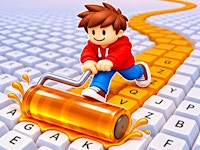
Paint My Keyboard is a colorful 3D obby simulator where every key you paint helps you earn more money! Start with a small, empty keyboard and turn it into a giant rainbow of colors. Paint keys, collect coins, unlock better equipment, and expand your keyboard one section at a time.
The fun part is that every painted key generates coins automatically! The more keys you color, the faster your money grows. Use your earnings to discover new paints, improve your painting speed, and unlock bigger areas. Can you build the largest and most colorful keyboard?
How to Play Paint My Keyboard?
- Color Unpainted Keys: Walk up to blank keycaps across your keyboard deck to coat them in bright, fresh paint.
- Collect Automatic Coin Income: Every painted key generates coins on its own over time. Circle back around your setup to scoop up your earnings and keep your upgrades moving.
- Unlock Higher-Value Paints: Spend your coins on new paint colors that multiply how much money each painted key produces.
- Upgrade Your Equipment: Improve your painting speed and gear efficiency so you can cover wide rows of keys in a fraction of the time.
- Expand Your Keyboard: Buy brand-new rows and sections to turn a modest starter board into the biggest, most colorful keyboard in the world.
Desktop:
- WASD / Arrow Keys: Move
- Mouse: Control the camera
Mobile:
- Joystick: Move
- Touch / Swipe: Control the camera
Can I Play Paint My Keyboard on Mobile?
Yes! Paint My Keyboard supports mobile phones and tablets. You can move using the on-screen joystick and control the camera with touch gestures.
How do I earn coins faster in Obby: Paint My Keyboard?
Focus on unlocking new paint tiers alongside keyboard expansions. Higher-tier paints increase the coin value generated by every key you color, while adding new rows multiplies your total passive income.
How do I make my keyboard bigger?
Once you collect enough coins from your painted keys, walk over to the expansion pads to purchase additional rows and whole new keyboard sections.
Who Developed Paint My Keyboard?
Paint My Keyboard is developed by Serbull, a game developer known for colorful 3D obby and simulator games.
If you enjoy Serbull’s games, you can also try these popular titles on TwoPlayerGames: